

I keep repeating that a quality network is a stronger currency than a vast untargeted network.
Last week I had a training with a sales team of a corporation from Finland & Denmark. They were ecstatic when they realized how easy it is to find the right connections on LinkedIn. So I decided to make more people happy by writing an article on this topic.
So, you’ve done your first step – you have an optimized LinkedIn profile. Now you have to start building your network.
Usually, we start connecting with people we already know /work with. So grab your Rolodex or whatever contact system you use and start checking if they are on LinkedIn. And don’t forget to send a personalized message request. 😉 You can also upload your mailing list, and LinkedIn will send an email to your contacts informing them about you being on LinkedIn and inviting them to connect.
The next step is building your network with people you don’t know but would like to know. Who are they? The answer is one of the targets you have to set up when deciding about your LinkedIn strategy. Many people I work with tell me they have problems connecting with strangers. Don’t worry about that; the purpose of LinkedIn is to connect with people.
I would suggest starting with the broadest search and narrowing it down. Some questions that may help you with that;
- What country are the people you want to connect with?
- Do you want to connect with people in a particular industry (FMCG, metal industry, automotive, healthcare…)?
- Are you targeting a particular job position/ title (i.e., purchase managers, marketing managers…)?
- Are you looking for connections in a specific company?
Once you’ve answered them, you get to work.
Let’s say I am looking for marketing managers in FMCG in Bih.

I write marketing manager in the search bar and click enter. And because I am looking for people with the role of marketing manager, I choose the option ‘people.’
I get over 23. million hits. Now, this is a bit difficult to scan. So now my search criteria come in.
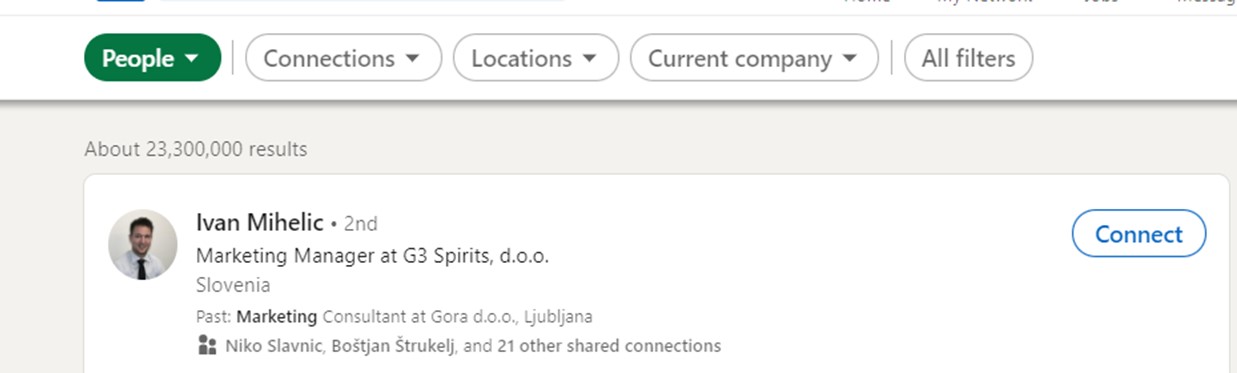
I start applying the filters. The first one is the country, BiH. And the number of hits is down to 7.300

Much better, but still a bit much to process. So I will filter them by the industry, FMCG. I choose the option’ consumer goods’ in filters. And the hits are down to 198.
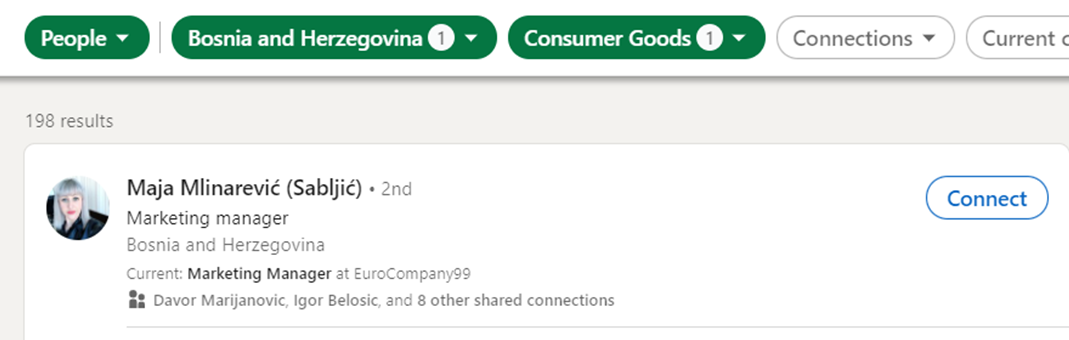
This is much more manageable.
The next step to take is to filter out the 2nd connections. If you remember from previous articles, we have 3 levels of connections; 1st are your connections, 2nd are the connections of your connections, and 3rd are people you have no connection in common. Often, 3rd connections ask for verification, so you may be required to input their email address to connect with them.
So filter out 2nd ones. We probably have the same results based on the number of hits; from this point on, our numbers will differ based on our network.
When I narrow it down, I come to 147 results. You may have a different number of results. From this point on, you can see some of the companies the people work for in Filters and you can start adding Current company filters to it to narrow it all down.

What you will see at this point is that you get results for the keywords marketing and manager, but not necessarily for a marketing manager.
You can avoid this. It’s called boolean search and we use it for advanced search queries. It’s a set of rules to apply in the following situations:
- “”- if you need an “exact” match with a phrase, name, or piece of information
- ˝managing director sales˝
- ( ) – for complex searches combining words or modifiers
- marketing AND (¨managing director sales˝)
- AND – for combining words
- ˝sales manager˝ AND ¨marketing manager˝
- NOT – exclude a particular term when searching
- ˝sales manager˝ not ¨director sales˝
- OR – searches for one or more words in a profile, page, or other assets
- ˝sales manager˝ OR ¨managing director sales˝
Once we’ve found people we’d like to connect with, we have to find some commonalities to create a personalized connection request.
We start by looking at their profile. The first section I look at is Activity. This section tells me if the person is active on LinkedIn, they create content and engage with other people’s content.
I love content creators. They give me a chance to read their content and then use it as an entry point. People love it when you show interest and referencing a piece of their content shows that.
If a person is not active, I check other parts of their profiles. I look for things we have in common;
- did we attend the same university,
- did we work at the same company,
- do we have some connections in common,
- are we part of the same organization…
and use this as the hook in my personalized connection request.
Be choosy. The more you know who you want to connect with, the more significant the value of your network.
Now you’ve found them, so connect with them. And one connection by one you make your network stronger.